ai-toolkit 训练 Flux Lora
参考文章:GitHub - ostris/ai-toolkit: Various AI scripts. Mostly Stable Diffusion stuff.
1 安装
git clone https://github.com/ostris/ai-toolkit.git
cd ai-toolkit
git submodule update --init --recursive
python3 -m venv venv
source venv/bin/activate
pip3 install torch
pip3 install -r requirements.txt
2 配置
新增一个 .env,配置huggingface的 token
HF_TOKEN=hf_gxxxxx
./config/flux.yaml
---
job: extension
config:
  # this name will be the folder and filename name
  name: "wglct"
  process:
    - type: 'sd_trainer'
      # root folder to save training sessions/samples/weights
      training_folder: "output"
      # uncomment to see performance stats in the terminal every N steps
#      performance_log_every: 1000
      device: cuda:0
      # if a trigger word is specified, it will be added to captions of training data if it does not already exist
      # alternatively, in your captions you can add [trigger] and it will be replaced with the trigger word
      trigger_word: "wglct"
      network:
        type: "lora"
        linear: 16
        linear_alpha: 16
      save:
        dtype: float16 # precision to save
        save_every: 250 # save every this many steps
        max_step_saves_to_keep: 10 # how many intermittent saves to keep
      datasets:
        # datasets are a folder of images. captions need to be txt files with the same name as the image
        # for instance image2.jpg and image2.txt. Only jpg, jpeg, and png are supported currently
        # images will automatically be resized and bucketed into the resolution specified
        # on windows, escape back slashes with another backslash so
        # "C:\\path\\to\\images\\folder"
        - folder_path: "datasets/wglct"
          caption_ext: "txt"
          caption_dropout_rate: 0.05  # will drop out the caption 5% of time
          shuffle_tokens: false  # shuffle caption order, split by commas
          cache_latents_to_disk: true  # leave this true unless you know what you're doing
          resolution: [ 512, 768, 1024 ]  # flux enjoys multiple resolutions
      train:
        batch_size: 2
        steps: 10000  # total number of steps to train 500 - 4000 is a good range
        gradient_accumulation_steps: 1
        train_unet: true
        train_text_encoder: false  # probably won't work with flux
        gradient_checkpointing: true  # need the on unless you have a ton of vram
        noise_scheduler: "flowmatch" # for training only
        optimizer: "prodigy"
        #optimizer: "adamw8bit"
        lr: 1
        # uncomment this to skip the pre training sample
#        skip_first_sample: true
        # uncomment to completely disable sampling
        disable_sampling: false
        # uncomment to use new vell curved weighting. Experimental but may produce better results
        linear_timesteps: true

        # ema will smooth out learning, but could slow it down. Recommended to leave on.
        ema_config:
          use_ema: true
          ema_decay: 0.99

        # will probably need this if gpu supports it for flux, other dtypes may not work correctly
        dtype: bf16
      model:
        # huggingface model name or path
        name_or_path: "black-forest-labs/FLUX.1-dev"
        is_flux: true
        quantize: true  # run 8bit mixed precision
#        low_vram: true  # uncomment this if the GPU is connected to your monitors. It will use less vram to quantize, but is slower.
      sample:
        sampler: "flowmatch" # must match train.noise_scheduler
        sample_every: 250 # sample every this many steps
        width: 1024
        height: 1024
        prompts:
          # you can add [trigger] to the prompts here and it will be replaced with the trigger word
#          - "[trigger] holding a sign that says 'I LOVE PROMPTS!'"\
          - "wglct, woman with red hair, playing chess at the park, bomb going off in the background"
          - "wglct, a woman holding a coffee cup, in a beanie, sitting at a cafe"
          - "wglct, a horse is a DJ at a night club, fish eye lens, smoke machine, lazer lights, holding a martini"
          - "wglct, a man showing off his cool new t shirt at the beach, a shark is jumping out of the water in the background"
        neg: ""  # not used on flux
        seed: 42
        walk_seed: true
        guidance_scale: 4
        sample_steps: 20
# you can add any additional meta info here. [name] is replaced with config name at top
meta:
  name: "[name]"
  version: '1.0'
3 数据集
以 万国来朝图 为例,在图片中截取不同位置的 1024x1024 的图片,用可以用更大的尺寸,但都要缩小为 1024x1024。
准备 30 张,上传到 Caption Helper,配置好 openai 和 groq 的 key。

给一个初始的提示词,然后点击 Enhance。
最后导出。
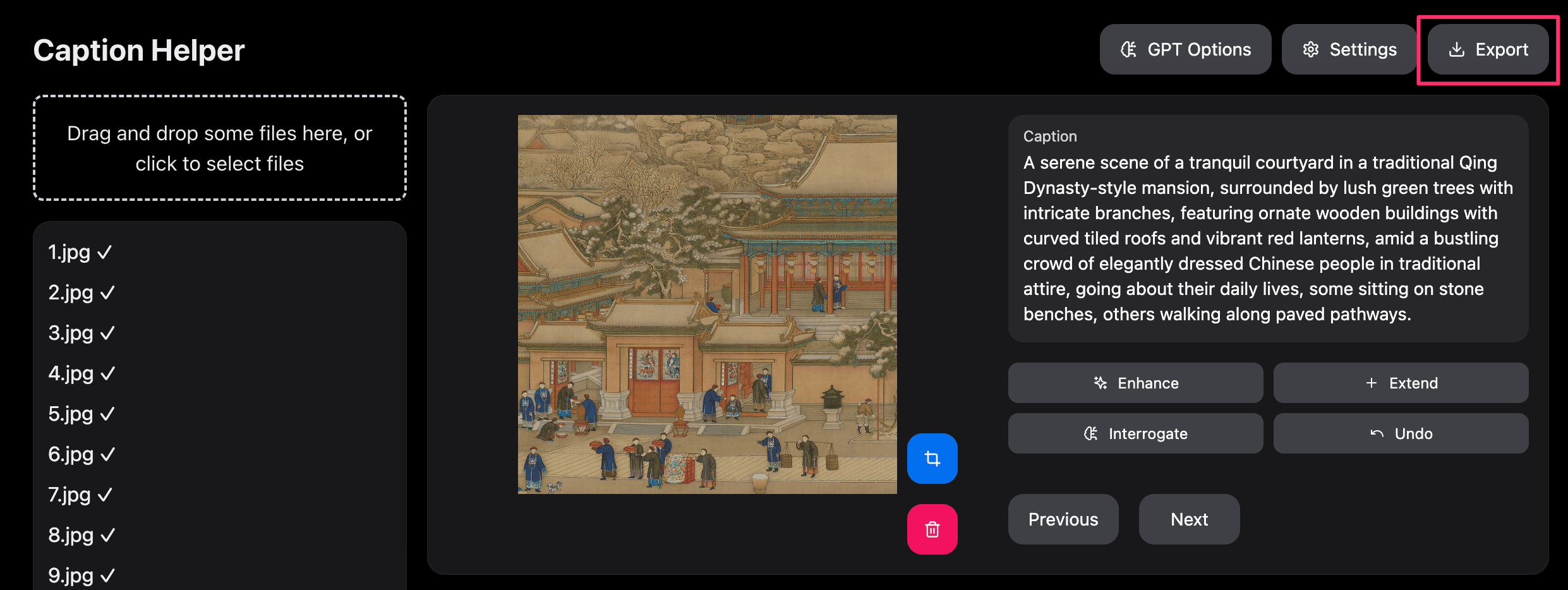
最后的生成的 jpg 和 txt 放到 ./datasets/wglct 中。
4 训练
运行 python run.py config/flux.yaml
比 sdxl 的训练要慢的多。10 个小时起步。
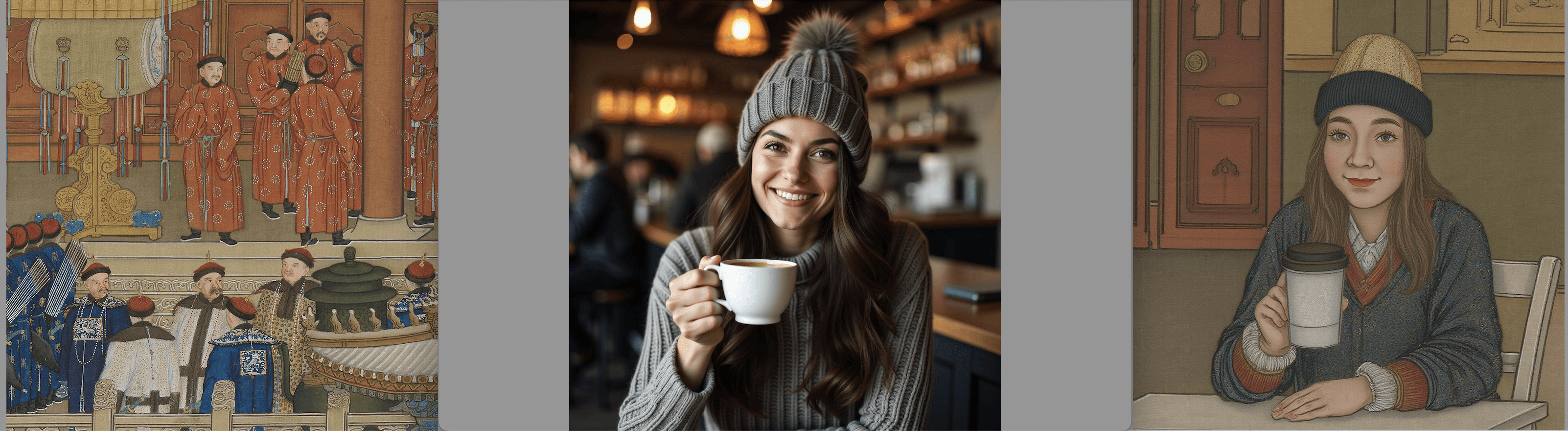
对比效果如下:
这是训练到3800 steps 的效果,目标是 10000 steps。
从左到右分别是数据集、未加 lora 出图,加 lora 出图。